
This post will show you how to install VLC on Ubuntu 11.10 and how to set it as a default application . Level : Beginners How to Install VLC media player on Ubuntu 11.10 : By default , Movie player is installed for video and Banshee is installed for Music . But you can install VLC media player through code in Ubuntu 11.10. To install VLC , run the following commands through terminal (Ctrl + Alt + T) sudo add-apt-repository ppa:n-muench/vlc sudo apt-get update sudo apt-get install vlc mozilla-plugin-vlc How to set as a Default one : Go to Control Gear [&hellip
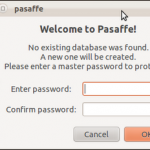
Do you have many passwords stored in your mind , want to store anywhere else ? If yes , then go for pasaffe . Pasaffe is an easy to use password manager for Gnome.Pasaffe uses a Password Safe 3.0 compatible database. How to Install in Ubuntu 11.10 : Open the terminal and run the following commands : sudo add-apt-repository ppa:mdeslaur/pasaffesudo apt-get updatesudo apt-get install pasaffe That’s it done !!
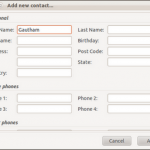
Dlume is a simple, gtk2-based addressbook. You can easily add, edit and delete records to/from an XML-format database. The Quick-search feature allows you find required entry in comfortable way. Export to CSV and HTML formats is also available. It can be installed through terminal . Open the terminal and run the following commands : sudo apt-get install dlume That’s it done ..!!
Previously , you can create desktop icon in Ubuntu by using “Create Launcher” option which was available when you right-click on desktop . But now in current versions like Ubuntu 11.04/11.10 you cannot create desktop icon in that same manner . In Ubuntu 11.04/ Ubuntu 11.10 , you have to install package to create desktop icon . First of all , Install Package through terminal . sudo apt-get install –no-install-recommends gnome-panel If done , Create your first desktop icon through following command. gnome-desktop-item-edit –create-new ~/Desktop That’s it done !!

This tutorial will show you how to install Thunderbird 8.0 version on Ubuntu .Before installing that, lets see what’s new in this version. What’s new : Thunderbird is based on the new Mozilla Gecko 8 engine Add-ons installed by third party programs are now disabled by default New Search and Find Shortcuts Improved accessibility of the attachment list Folder switching pane widget has been removed, can be added back with the Folder Pane View Switcher Add-on. How to Install : Open the terminal and run the following commands : sudo add-apt-repository ppa:mozillateam/thunderbird-stable sudo apt-get update sudo apt-get install thunderbird
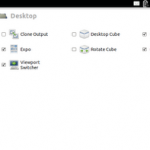
This is simple and useful tip for Ubuntu 11.10 users. By default , Autohide option is enabled in Unity & there is no option to disable it . This tutorial describes the steps needed to disable Autohide option in Ubuntu 11.10. Step 1 : Install CompizConfig Settings Manager . It can be done through terminal . Open the terminal and run the following command . sudo apt-get install compizconfig-settings-manager Step 2 : Go to CompizConfig Settings Manager , Navigate through Desktop ->Ubuntu Unity Plugin . Click Ubuntu Unity plugin , here you can see “Hide Launcher” for which Dodge windows is set by default. [&hellip

This tutorial will show you how to install new version of Firefox – Firefox 8.0 on Ubuntu . To install , either you can upgrade or can do a fresh install . Before installing Firefox 8.0, Lets see what’s new in it : Add-ons installed by third party programs are now disabled by default Added Twitter to the search bar for select locales. Additional locale support will be added in the future Added a preference to load tabs on demand, improving start-up time when windows are restored Improved performance and memory handling when using Added CORS support for cross-domain textures in WebGL Added support for HTML5 context [&hellip

By default , Flash player is not installed in Ubuntu. We generally install flash player in Ubuntu to watch youtube videos . There is also alternative way to overcome this issue. Recently i came across youtube desktop application called Minitube which can be installed in Ubuntu & we can watch youtube videos without any flash player. Lets see what’s new in Minitube’s recent version Minitube 1.6 . What’s new in 1.6: Find the missing parts of a video Share a video using Facebook, Twitter or email Fixed bug with very short videos not playing Fixed a (rather paranoid) security issue [&hellip
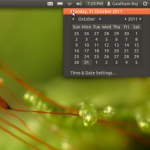
This tutorial will show you how to display multiple time zone in Ubuntu 11.10 . By default it comes with calendar ,but you can customize in your own way. Step 1 : Go to top panel and Navigate through Clock -> Time and date settings . Step 2 : Next you have to disable “Monthly calendar” which is enabled by default in Ubuntu 11.10 , but at the same time you have to enable “Time in other locations” option which is disabled by default. Before (Which comes by default) : After Our change : Step 3 : Select “Choose location” [&hellip
Good news for Ubuntu lovers !! Ubuntu 11.10 is available to download . It released with many new features and bug fixes . We will Analyze and come up with detailed review in next post . Download link : http://www.ubuntu.com/download http://releases.ubuntu.com/oneiric/ Image Source : Link