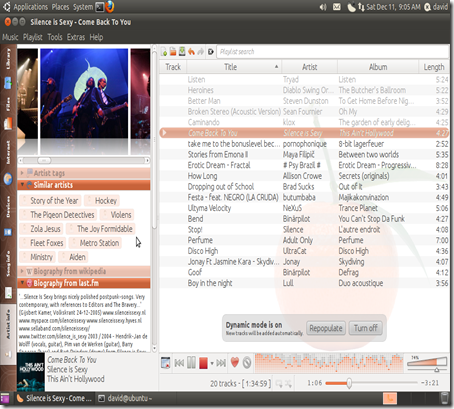
Clementine is a multiplatform music player. It is inspired by Amarok 1.4, focusing on a fast and easy-to-use interface for searching and playing your music.
Features :
- Search and play your local music library.
- Listen to internet radio from Last.fm, SomaFM, Magnatune, Jamendo and Icecast.
- Create smart playlists and dynamic playlists.
- Tabbed playlists, import and export M3U, XSPF, PLS and ASX.
- Visualisations from projectM.
- Lyrics and artist biographies and photos.
- Transcode music into MP3, Ogg Vorbis, Ogg Speex, FLAC or AAC.
- Edit tags on MP3 and OGG files, organise your music.
- Download missing album cover art from Last.fm.
- Cross-platform – works on Windows, Mac OS X and Linux.
- Native desktop notifications on Linux (libnotify) and Mac OS X (Growl).
- Remote control using a Wii Remote, MPRIS or the command-line.
- Copy music to your iPod, iPhone, MTP or mass-storage USB player.
- Queue manager.
How to Install :
Open the terminal and run the following commands .
sudo add-apt-repository ppa:me-davidsansome/clementinesudo apt-get update
sudo apt-get install climentineScreenshots :

Related posts:
How to : Install Sinthgunt –Open source Graphical UI
Minitube 1.6 : Youtube Desktop Application | What's new | How to Install
How to:Install Gimp 2.6.11 in Ubuntu 10.10 via PPA
Ubuntu tweak 0.6 in Ubuntu 11.10
[How to] Install GRUB Customizer 3.0 in Ubuntu 12.04
How to : Display Multiple Time Zone in Ubuntu 11.10 (Oneiric Ocelot)
