Personally I think it’s better to remove Guest session from login as it prevents from unauthorised access of our local drive data. In Ubuntu 12.04 , we can remove Guest session from login through small changes in Lightdm.conf file . This tutorial will show you how to remove Guest session from Ubuntu 12.04 which is present by default in it . Step 1 : Open the terminal and run the following command to edit the Lightdm.conf . sudo gedit /etc/lightdm/lightdm.conf Step 2 : Add “Allow-Guest=false” and [&hellip
Author Archive
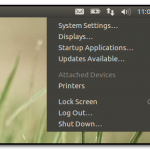
This tutorial will show how to enable Auto Hide feature in Unity . By Default , Auto-Hide feature is disabled in Unity . To auto-hide unity launcher , go to Çontrol Gear –> System settings . Under Personal Category , Click Appearance tab. Under Appearance tab , there are two sub – tabs are available : Look and behaviour . Under behavior tab, Change the state of “Auto Hide the launcher” option from OFF to ON . That’s it done !!
Few hours ago , Mark Shuttleworth has announced the codename for Ubuntu 12.10 . It will be called Quantal Quetzal. Don’t know? Quantal Quetzal are strikingly colored birds in the trogon family. They are found in forests and woodlands, especially in humid highlands, with the five species from the genus Pharomachrus being exclusively Neotropical, while the single Euptilotis species is almost entirely restricted to western Mexico. Want to know more about codename , refer the links which is mentioned in References . References : http://www.markshuttleworth.com/archives/1121 http://en.wikipedia.org/wiki/Quetzal
Pinta is a free, open source drawing/editing program modeled after Paint.NET. Its goal is to provide users with a simple yet powerful way to draw and manipulate images on Linux, Mac, and Windows. New Features in Pinta 4.2 : Individual layers can now be rotated arbitrarily Added specific mouse cursors for tools (pencil, paintbucket, etc) Autocrop of image Gradient tool now takes advantage of multiple cores to speed up rendering time Added image preview to the images pad (#791161) Added white text background option (#892690) Show image previews in the Open File dialog How to install : For Ubuntu 11.10 [&hellip

Canonical has revealed the schedule for Ubuntu 12.10 release, but still the code name for Ubuntu 12.10 is not yet revealed . Similar to Ubuntu 12.04 which is going to release on April 26 , Ubuntu 12.10 will also have 3 Alpha versions, 2 Betas and no release candidate . Release Schedule : June 7th Alpha I June 28th Alpha II August 2nd Alpha III September 6th Beta I September 27th Beta II October 18th Final Release
This tutorial will show you how to install Dropbox in Ubuntu 12.04 . If you are newbie , then read following link to know more about Dropbox . About Dropbox Also read : How to : Automatically transfer files from Dropbox to Picasa or Box.net through Dropbox Automator If you are new to Dropbox , then sign up through following link to use 2GB of free space: http://db.tt/KUcNY7iM Installation Steps : Step 1 : Open the terminal and run the following command to add the Dropbox respository key . sudo apt-key adv –keyserver pgp.mit.edu –recv-keys 5044912E Step 2 : Again [&hellip

This tutorial will show you how to install Google Earth in Ubuntu 12.04 . If you are still using Ubuntu 11.10 , then either you can upgrade to Ubuntu 12.04 or install Google Earth 6.2 in Ubuntu 11.10 itself . Also read : [How to] Install Google Earth 6.2 in Ubuntu 11.10 [ 32Bit & 64 Bit] If you are curious to know more about Google 6.2 version , then refer Google’s article . http://google-latlong.blogspot.in/2012/01/google-earth-62-its-beautiful-world.html Installation Instructions : For 32 Bit : Open the terminal and run the following command to download the Google 6.2 package . wget http://dl.google.com/dl/earth/client/current/google-earth-stable_current_i386.deb Again , [&hellip
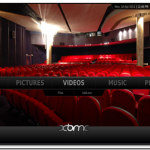
XBMC Eden , latest release of Award winning free and open source software media player is available in official Ubuntu 12.04 repositories . Hereafter for installation, you can install through Ubuntu software centre in spite of installing through third party PPAs. It happened because of XBMC and Debian developer Andres Mejia , who integrated XBMC eden with Debian . For more info : http://xbmc.org/theuni/2012/04/10/xbmc-accepted-into-debian/ Excerpt from XBMC Blog : Linux users rejoice! Thanks primarily to the hard work of Andres Mejia, XBMC has been accepted into the official Debian distribution! In the past we have been unable to make it [&hellip
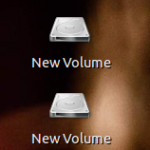
Whenever we insert the USB or use any drive in the Ubuntu, by default Mounted volumes are displayed in the desktop . Sometimes its annoying for users who have desktop full of icons . So in this tutorial , we will see how to hide the Mounted volumes on the desktop in the Ubuntu . To Hide Mounted Volume in the Desktop: Go to terminal and run the following commands gsettings set org.gnome.nautilus.desktop volumes-visible false To Show Mounted Volume in the desktop / To Revert the changes : Open the terminal and run the following command: gsettings set org.gnome.nautilus.desktop [&hellip
If you are searching for alternative for Unity , then this tutorial will help you in switching to another Environment called Cinnamon. Cinnamon is simple to use and a best alternative to Unity . About Cinnamon Term : Cinnamon is a spice obtained from the inner bark of several trees that is used in both sweet and savoury foods. Cinnamon trees are native to South East Asia, and its origin was a mystery to Europeans until the sixteenth century. It looks, smells and tastes fantastic …and it’s also full of history! Click below link to know more : http://cinnamon.linuxmint.com/?p=1 How [&hellip